

Showing posts with label UNIX. Show all posts
Showing posts with label UNIX. Show all posts
Friday, January 18, 2019


Tuesday, April 19, 2016
Oracle UNIX Interview Questions and Answers (FAQs)
1) What exactly is UNIX?
UNIX is written in C and it is portable. It runs on a range of computers from microprocessors to the largest mainframes. The source code is available and written in high level language which makes it easy to adapt for a particular requirement.
UNIX is written in C and it is portable. It runs on a range of computers from microprocessors to the largest mainframes. The source code is available and written in high level language which makes it easy to adapt for a particular requirement.
2) Explain about the return key?
Return Key signifies the end of a line of input; it must be presses before the system will interpret the characters you have types. It serves as an example of control character return key can be typed by holding the control key and typing M.
Return Key signifies the end of a line of input; it must be presses before the system will interpret the characters you have types. It serves as an example of control character return key can be typed by holding the control key and typing M.
3) Explain about DELETE and BREAK?
These keys have significant meaning sometimes DELETE is called as RUBOUT key. Break is sometimes called INTERRUPT. In most SYSTEMS the delete key stops a program immediately, without waiting for it to finish on some systems, Ctrl-C provides this service. Break is a synonym for DELETE or CTRL-C.
4) Explain about TYPE-ahead?
The kernel reads what you type as you type it, even if it’s busy with something else, so you can type as fast as you want, whenever you want, even when some command is printing at you. Your I/P characters will appear intermixed with the O/P characters but they will be stored away and interpreted in the correct order.
5) How to get a computer aided instruction?
Your system may have a command called learn which provides computer aided instruction on the file system and basic commands, the editor, document preparation and even “C” programming. IF $learn exists on your system, it will teach you what to do from there.
6) Explain about cat?
Cat is the simplest of all the printing commands. Cat prints the contents of all the files named by its arguments. The named file or files are catenated the terminal one after another with nothing between. You have to be quick with CTRL-S to stop O/P from cat before it flows off your screen.
7) How to search files for lines that match a pattern?
Grep command searches for files for lines which match a pattern.
E.g. g/regular expression/p.grep will also look for lines that don’t match the pattern, when the option-V is sued. grep can be used to search several files in that case it will prefix the filename.
8) Describe about the root file system?
The root file system has to be present for the system to execute /bin, /dev, and /etc are always kept on the root system because when the system starts only files in the root system are accessible and some files such as /bin/sh are needed to run at all. During the boot strap operation, all the file systems are checked for self consistency and attached to the root systems.
9) Explain about ZAP?
ZAP, which selectively kills processes, is another program. The main problem with that version is speed; it creates so many processes that it runs slowly, which is especially undesirable for a program that kills errant processes rewriting ZAP in C will make it faster.
10) Suppose that you are using a terminal in which the screen size is bigger than the normal 24 lines. If you want to use p and take full advantage of your terminal capabilities what choices are open to you?
You have to specify the screen size each time you use P. $P-36.
Also you could put a shell file in your bin.
$cat/usr/you/bin/p
Exec/usr/bin/p-36$*
$
Another solution is to modify p to use an environment variable that defines the properties of your terminal.
11) Explain abut low-level I/O?
The lowest of I/O is a direct entry into the O.S. your program reads or writes files in chunks of any convenient size. The kernel buffers your data into chunks that match the peripheral devices and schedule operations on the devices to optimize their performance over all users.
12) What are the special arrangements to make a terminal i/p and o/p?
When it is started by the shell, a program inherits three open files, with file descriptor 0, 1 and 2 called the standard i/p, the standard o/p, and the standard error. If the program reads “0” and writes descriptors 1 and 2, it can do I/O without opening files.
13) Explain about read slow?
One can call to read return 0 which signals the end of file life, if data is written on that file then a subsequent read will be able to find more bytes available. This observation is the basis of a program called readslow which continues to read its input, regardless of whether it got an end of file or not. Readslow is handy for watching the progress of the file.
14) What function does “errno” do?
Sometimes it is nice to know what specific error occurred; for this purpose all system calls, when appropriate, leave an error number in an external integer called calls, when appropriate, leave an error number in an external integer called errno. By using errno, your program can, for example, determine whether an attempt to open a file failed because it did not exist or because you lacked permission to read it.
15) Describe the process of “spname”?
The operation of spname is straightforward enough, although there are a lot of boundary conditions to get right. Suppose the file name is /d1/d2/f. The basic ideas is to peel off the first component (/), then search that directory for a name close to the nest component (dl), then search that directory for something near d2, and so on, until a match has been found for each component. If at any stage there isn’t a plausible candidate in the directory, the search is abandoned.
16) Explain about fork?
Splitting is done by a system call named fork. Proc_id = fork (); splits the program into two copies, both of which continue to run. The only difference between the two is the value returned by fork, the process-id. Two copies of the program are made by the fork. In the child, the value returned by fork is zero, so it calls execlp, which does the command line and then dies. In the parent, fork returns non-zero so it skips the execlp.
17) What is the easiest way to store variables and explain?
The easiest way to store the values of the variables is in a 26-element array; the single-letter variable name can be used to index the array. But if the grammar is to process both variable names and values in the same stack, yacc has to be told that its stack contains a union of a double and an int, not just a double.
1. How are devices represented in UNIX?
All devices are represented by files called special files that are located in/dev directory. Thus, device files and other files are named and accessed in the same way. A 'regular file' is just an ordinary data file in the disk. A 'block special file' represents a device with characteristics similar to a disk (data transfer in terms of blocks). A 'character special file' represents a device with characteristics similar to a keyboard (data transfer is by stream of bits in sequential order).
2. What is 'inode'?
All UNIX files have its description stored in a structure called 'inode'. The inode contains info about the file-size, its location, time of last access, time of last modification, permission and so on. Directories are also represented as files and have an associated inode. In addition to descriptions about the file, the inode contains pointers to the data blocks of the file. If the file is large, inode has indirect pointer to a block of pointers to additional data blocks (this further aggregates for larger files). A block is typically 8k.
Inode consists of the following fields:
* File owner identifier
* File type
* File access permissions
* File access times
* Number of links
* File size
* Location of the file data
3. Brief about the directory representation in UNIX
A Unix directory is a file containing a correspondence between filenames and inodes. A directory is a special file that the kernel maintains. Only kernel modifies directories, but processes can read directories. The contents of a directory are a list of filename and inode number pairs. When new directories are created, kernel makes two entries named '.' (refers to the directory itself) and '..' (refers to parent directory).
System call for creating directory is mkdir (pathname, mode).
These keys have significant meaning sometimes DELETE is called as RUBOUT key. Break is sometimes called INTERRUPT. In most SYSTEMS the delete key stops a program immediately, without waiting for it to finish on some systems, Ctrl-C provides this service. Break is a synonym for DELETE or CTRL-C.
4) Explain about TYPE-ahead?
The kernel reads what you type as you type it, even if it’s busy with something else, so you can type as fast as you want, whenever you want, even when some command is printing at you. Your I/P characters will appear intermixed with the O/P characters but they will be stored away and interpreted in the correct order.
5) How to get a computer aided instruction?
Your system may have a command called learn which provides computer aided instruction on the file system and basic commands, the editor, document preparation and even “C” programming. IF $learn exists on your system, it will teach you what to do from there.
6) Explain about cat?
Cat is the simplest of all the printing commands. Cat prints the contents of all the files named by its arguments. The named file or files are catenated the terminal one after another with nothing between. You have to be quick with CTRL-S to stop O/P from cat before it flows off your screen.
7) How to search files for lines that match a pattern?
Grep command searches for files for lines which match a pattern.
E.g. g/regular expression/p.grep will also look for lines that don’t match the pattern, when the option-V is sued. grep can be used to search several files in that case it will prefix the filename.
8) Describe about the root file system?
The root file system has to be present for the system to execute /bin, /dev, and /etc are always kept on the root system because when the system starts only files in the root system are accessible and some files such as /bin/sh are needed to run at all. During the boot strap operation, all the file systems are checked for self consistency and attached to the root systems.
9) Explain about ZAP?
ZAP, which selectively kills processes, is another program. The main problem with that version is speed; it creates so many processes that it runs slowly, which is especially undesirable for a program that kills errant processes rewriting ZAP in C will make it faster.
10) Suppose that you are using a terminal in which the screen size is bigger than the normal 24 lines. If you want to use p and take full advantage of your terminal capabilities what choices are open to you?
You have to specify the screen size each time you use P. $P-36.
Also you could put a shell file in your bin.
$cat/usr/you/bin/p
Exec/usr/bin/p-36$*
$
Another solution is to modify p to use an environment variable that defines the properties of your terminal.
11) Explain abut low-level I/O?
The lowest of I/O is a direct entry into the O.S. your program reads or writes files in chunks of any convenient size. The kernel buffers your data into chunks that match the peripheral devices and schedule operations on the devices to optimize their performance over all users.
12) What are the special arrangements to make a terminal i/p and o/p?
When it is started by the shell, a program inherits three open files, with file descriptor 0, 1 and 2 called the standard i/p, the standard o/p, and the standard error. If the program reads “0” and writes descriptors 1 and 2, it can do I/O without opening files.
13) Explain about read slow?
One can call to read return 0 which signals the end of file life, if data is written on that file then a subsequent read will be able to find more bytes available. This observation is the basis of a program called readslow which continues to read its input, regardless of whether it got an end of file or not. Readslow is handy for watching the progress of the file.
14) What function does “errno” do?
Sometimes it is nice to know what specific error occurred; for this purpose all system calls, when appropriate, leave an error number in an external integer called calls, when appropriate, leave an error number in an external integer called errno. By using errno, your program can, for example, determine whether an attempt to open a file failed because it did not exist or because you lacked permission to read it.
15) Describe the process of “spname”?
The operation of spname is straightforward enough, although there are a lot of boundary conditions to get right. Suppose the file name is /d1/d2/f. The basic ideas is to peel off the first component (/), then search that directory for a name close to the nest component (dl), then search that directory for something near d2, and so on, until a match has been found for each component. If at any stage there isn’t a plausible candidate in the directory, the search is abandoned.
16) Explain about fork?
Splitting is done by a system call named fork. Proc_id = fork (); splits the program into two copies, both of which continue to run. The only difference between the two is the value returned by fork, the process-id. Two copies of the program are made by the fork. In the child, the value returned by fork is zero, so it calls execlp, which does the command line and then dies. In the parent, fork returns non-zero so it skips the execlp.
17) What is the easiest way to store variables and explain?
The easiest way to store the values of the variables is in a 26-element array; the single-letter variable name can be used to index the array. But if the grammar is to process both variable names and values in the same stack, yacc has to be told that its stack contains a union of a double and an int, not just a double.
1. How are devices represented in UNIX?
All devices are represented by files called special files that are located in/dev directory. Thus, device files and other files are named and accessed in the same way. A 'regular file' is just an ordinary data file in the disk. A 'block special file' represents a device with characteristics similar to a disk (data transfer in terms of blocks). A 'character special file' represents a device with characteristics similar to a keyboard (data transfer is by stream of bits in sequential order).
2. What is 'inode'?
All UNIX files have its description stored in a structure called 'inode'. The inode contains info about the file-size, its location, time of last access, time of last modification, permission and so on. Directories are also represented as files and have an associated inode. In addition to descriptions about the file, the inode contains pointers to the data blocks of the file. If the file is large, inode has indirect pointer to a block of pointers to additional data blocks (this further aggregates for larger files). A block is typically 8k.
Inode consists of the following fields:
* File owner identifier
* File type
* File access permissions
* File access times
* Number of links
* File size
* Location of the file data
3. Brief about the directory representation in UNIX
A Unix directory is a file containing a correspondence between filenames and inodes. A directory is a special file that the kernel maintains. Only kernel modifies directories, but processes can read directories. The contents of a directory are a list of filename and inode number pairs. When new directories are created, kernel makes two entries named '.' (refers to the directory itself) and '..' (refers to parent directory).
System call for creating directory is mkdir (pathname, mode).
4. What are the Unix system calls for I/O?
* open(pathname,flag,mode) - open file
* creat(pathname,mode) - create file
* close(filedes) - close an open file
* read(filedes,buffer,bytes) - read data from an open file
* write(filedes,buffer,bytes) - write data to an open file
* lseek(filedes,offset,from) - position an open file
* dup(filedes) - duplicate an existing file descriptor
* dup2(oldfd,newfd) - duplicate to a desired file descriptor
* fcntl(filedes,cmd,arg) - change properties of an open file
* ioctl(filedes,request,arg) - change the behaviour of an open file
The difference between fcntl anf ioctl is that the former is intended for any open file, while the latter is for device-specific operations.
5. How do you change File Access Permissions?
Every file has following attributes:
owner's user ID ( 16 bit integer )
owner's group ID ( 16 bit integer )
File access mode word
'r w x -r w x- r w x'
(user permission-group permission-others permission)
r-read, w-write, x-execute
To change the access mode, we use chmod(filename,mode).
Example 1:
To change mode of myfile to 'rw-rw-r–' (ie. read, write permission for user - read,write permission for group - only read permission for others) we give the args as:
chmod(myfile,0664) .
Each operation is represented by discrete values
'r' is 4
'w' is 2
'x' is 1
Therefore, for 'rw' the value is 6(4+2).
Example 2:
To change mode of myfile to 'rwxr–r–' we give the args as:
chmod(myfile,0744).
6. What are links and symbolic links in UNIX file system?
A link is a second name (not a file) for a file. Links can be used to assign more than one name to a file, but cannot be used to assign a directory more than one name or link filenames on different computers.
Symbolic link 'is' a file that only contains the name of another file.Operation on the symbolic link is directed to the file pointed by the it.Both the limitations of links are eliminated in symbolic links.
Commands for linking files are:
Link ln filename1 filename2
Symbolic link ln -s filename1 filename2
7. What is a FIFO?
FIFO are otherwise called as 'named pipes'. FIFO (first-in-first-out) is a special file which is said to be data transient. Once data is read from named pipe, it cannot be read again. Also, data can be read only in the order written. It is used in interprocess communication where a process writes to one end of the pipe (producer) and the other reads from the other end (consumer).
8. How do you create special files like named pipes and device files?
The system call mknod creates special files in the following sequence.
1. kernel assigns new inode,
2. sets the file type to indicate that the file is a pipe, directory or special file,
3. If it is a device file, it makes the other entries like major, minor device numbers.
For example:
If the device is a disk, major device number refers to the disk controller and minor device number is the disk.
9. Discuss the mount and unmount system calls
The privileged mount system call is used to attach a file system to a directory of another file system; the unmount system call detaches a file system. When you mount another file system on to your directory, you are essentially splicing one directory tree onto a branch in another directory tree. The first argument to mount call is the mount point, that is , a directory in the current file naming system. The second argument is the file system to mount to that point. When you insert a cdrom to your unix system's drive, the file system in the cdrom automatically mounts to /dev/cdrom in your system.
10. How does the inode map to data block of a file?
Inode has 13 block addresses. The first 10 are direct block addresses of the first 10 data blocks in the file. The 11th address points to a one-level index block. The 12th address points to a two-level (double in-direction) index block. The 13th address points to a three-level(triple in-direction)index block. This provides a very large maximum file size with efficient access to large files, but also small files are accessed directly in one disk read.
11. What is a shell?
A shell is an interactive user interface to an operating system services that allows an user to enter commands as character strings or through a graphical user interface. The shell converts them to system calls to the OS or forks off a process to execute the command. System call results and other information from the OS are presented to the user through an interactive interface. Commonly used shells are sh,csh,ks etc.
12. Brief about the initial process sequence while the system boots up.
While booting, special process called the 'swapper' or 'scheduler' is created with Process-ID 0. The swapper manages memory allocation for processes and influences CPU allocation. The swapper inturn creates 3 children:
* the process dispatcher,
* vhand and
* dbflush
with IDs 1,2 and 3 respectively.
This is done by executing the file /etc/init. Process dispatcher gives birth to the shell. Unix keeps track of all the processes in an internal data structure called the Process Table (listing command is ps -el).
13. What are various IDs associated with a process?
Unix identifies each process with a unique integer called ProcessID. The process that executes the request for creation of a process is called the 'parent process' whose PID is 'Parent Process ID'. Every process is associated with a particular user called the 'owner' who has privileges over the process. The identification for the user is 'UserID'. Owner is the user who executes the process. Process also has 'Effective User ID' which determines the access privileges for accessing resources like files.
* getpid() -process id
* getppid() -parent process id
* getuid() -user id
* geteuid() -effective user id
14. Explain fork() system call.
The `fork()' used to create a new process from an existing process. The new process is called the child process, and the existing process is called the parent. We can tell which is which by checking the return value from `fork()'. The parent gets the child's pid returned to him, but the child gets 0 returned to him.
15. Predict the output of the following program code
main()
{
fork();
printf("Hello World!");
}
Answer:
Hello World!Hello World!
* open(pathname,flag,mode) - open file
* creat(pathname,mode) - create file
* close(filedes) - close an open file
* read(filedes,buffer,bytes) - read data from an open file
* write(filedes,buffer,bytes) - write data to an open file
* lseek(filedes,offset,from) - position an open file
* dup(filedes) - duplicate an existing file descriptor
* dup2(oldfd,newfd) - duplicate to a desired file descriptor
* fcntl(filedes,cmd,arg) - change properties of an open file
* ioctl(filedes,request,arg) - change the behaviour of an open file
The difference between fcntl anf ioctl is that the former is intended for any open file, while the latter is for device-specific operations.
5. How do you change File Access Permissions?
Every file has following attributes:
owner's user ID ( 16 bit integer )
owner's group ID ( 16 bit integer )
File access mode word
'r w x -r w x- r w x'
(user permission-group permission-others permission)
r-read, w-write, x-execute
To change the access mode, we use chmod(filename,mode).
Example 1:
To change mode of myfile to 'rw-rw-r–' (ie. read, write permission for user - read,write permission for group - only read permission for others) we give the args as:
chmod(myfile,0664) .
Each operation is represented by discrete values
'r' is 4
'w' is 2
'x' is 1
Therefore, for 'rw' the value is 6(4+2).
Example 2:
To change mode of myfile to 'rwxr–r–' we give the args as:
chmod(myfile,0744).
6. What are links and symbolic links in UNIX file system?
A link is a second name (not a file) for a file. Links can be used to assign more than one name to a file, but cannot be used to assign a directory more than one name or link filenames on different computers.
Symbolic link 'is' a file that only contains the name of another file.Operation on the symbolic link is directed to the file pointed by the it.Both the limitations of links are eliminated in symbolic links.
Commands for linking files are:
Link ln filename1 filename2
Symbolic link ln -s filename1 filename2
7. What is a FIFO?
FIFO are otherwise called as 'named pipes'. FIFO (first-in-first-out) is a special file which is said to be data transient. Once data is read from named pipe, it cannot be read again. Also, data can be read only in the order written. It is used in interprocess communication where a process writes to one end of the pipe (producer) and the other reads from the other end (consumer).
8. How do you create special files like named pipes and device files?
The system call mknod creates special files in the following sequence.
1. kernel assigns new inode,
2. sets the file type to indicate that the file is a pipe, directory or special file,
3. If it is a device file, it makes the other entries like major, minor device numbers.
For example:
If the device is a disk, major device number refers to the disk controller and minor device number is the disk.
9. Discuss the mount and unmount system calls
The privileged mount system call is used to attach a file system to a directory of another file system; the unmount system call detaches a file system. When you mount another file system on to your directory, you are essentially splicing one directory tree onto a branch in another directory tree. The first argument to mount call is the mount point, that is , a directory in the current file naming system. The second argument is the file system to mount to that point. When you insert a cdrom to your unix system's drive, the file system in the cdrom automatically mounts to /dev/cdrom in your system.
10. How does the inode map to data block of a file?
Inode has 13 block addresses. The first 10 are direct block addresses of the first 10 data blocks in the file. The 11th address points to a one-level index block. The 12th address points to a two-level (double in-direction) index block. The 13th address points to a three-level(triple in-direction)index block. This provides a very large maximum file size with efficient access to large files, but also small files are accessed directly in one disk read.
11. What is a shell?
A shell is an interactive user interface to an operating system services that allows an user to enter commands as character strings or through a graphical user interface. The shell converts them to system calls to the OS or forks off a process to execute the command. System call results and other information from the OS are presented to the user through an interactive interface. Commonly used shells are sh,csh,ks etc.
12. Brief about the initial process sequence while the system boots up.
While booting, special process called the 'swapper' or 'scheduler' is created with Process-ID 0. The swapper manages memory allocation for processes and influences CPU allocation. The swapper inturn creates 3 children:
* the process dispatcher,
* vhand and
* dbflush
with IDs 1,2 and 3 respectively.
This is done by executing the file /etc/init. Process dispatcher gives birth to the shell. Unix keeps track of all the processes in an internal data structure called the Process Table (listing command is ps -el).
13. What are various IDs associated with a process?
Unix identifies each process with a unique integer called ProcessID. The process that executes the request for creation of a process is called the 'parent process' whose PID is 'Parent Process ID'. Every process is associated with a particular user called the 'owner' who has privileges over the process. The identification for the user is 'UserID'. Owner is the user who executes the process. Process also has 'Effective User ID' which determines the access privileges for accessing resources like files.
* getpid() -process id
* getppid() -parent process id
* getuid() -user id
* geteuid() -effective user id
14. Explain fork() system call.
The `fork()' used to create a new process from an existing process. The new process is called the child process, and the existing process is called the parent. We can tell which is which by checking the return value from `fork()'. The parent gets the child's pid returned to him, but the child gets 0 returned to him.
15. Predict the output of the following program code
main()
{
fork();
printf("Hello World!");
}
Answer:
Hello World!Hello World!
Explanation:
The fork creates a child that is a duplicate of the parent process. The child begins from the fork().All the statements after the call to fork() will be executed twice.(once by the parent process and other by child). The statement before fork() is executed only by the parent process.
16. Predict the output of the following program code
main()
{
fork(); fork(); fork();
printf("Hello World!");
}
Answer:
"Hello World" will be printed 8 times.
Explanation:The fork creates a child that is a duplicate of the parent process. The child begins from the fork().All the statements after the call to fork() will be executed twice.(once by the parent process and other by child). The statement before fork() is executed only by the parent process.
16. Predict the output of the following program code
main()
{
fork(); fork(); fork();
printf("Hello World!");
}
Answer:
"Hello World" will be printed 8 times.
2^n times where n is the number of calls to fork()
17. List the system calls used for process management:
System calls Description
* fork() To create a new process
* exec() To execute a new program in a process
* wait() To wait until a created process completes its execution
* exit() To exit from a process execution
* getpid() To get a process identifier of the current process
* getppid() To get parent process identifier
* nice() To bias the existing priority of a process
* brk() To increase/decrease the data segment size of a process.
18. How can you get/set an environment variable from a program?
Getting the value of an environment variable is done by using `getenv()'. Setting the value of an environment variable is done by using `putenv()'.
19. How can a parent and child process communicate?
A parent and child can communicate through any of the normal inter-process communication schemes (pipes, sockets, message queues, shared memory), but also have some special ways to communicate that take advantage of their relationship as a parent and child. One of the most obvious is that the parent can get the exit status of the child.
20. What is a zombie?
When a program forks and the child finishes before the parent, the kernel still keeps some of its information about the child in case the parent might need it - for example, the parent may need to check the child's exit status. To be able to get this information, the parent calls `wait()'; In the interval between the child terminating and the parent calling `wait()', the child is said to be a `zombie' (If you do `ps', the child will have a `Z' in its status field to indicate this.)
21. What are the process states in Unix?
As a process executes it changes state according to its circumstances. Unix processes have the following states:
Running : The process is either running or it is ready to run .
Waiting : The process is waiting for an event or for a resource.
Stopped : The process has been stopped, usually by receiving a signal.
Zombie : The process is dead but have not been removed from the process table.
Tuesday, November 10, 2015
Oracle UNIX Interview Questions and Answers
1. How do you list the files in
an UNIX directory while also showing hidden files?
ls -ltra
2. How do you execute a UNIX
command in the background?
Use the "&"
3. What UNIX command will control
the default file permissions when files are created?
Umask
4. Explain the read, write, and
execute permissions on a UNIX directory.
Read allows you to see and list the directory
contents.
Write allows you to create, edit and delete files
and subdirectories in the directory.
Execute gives you the previous read/write
permissions plus allows you to change into the directory and execute programs
or shells from the directory.
5. the
difference between a soft link and a
hard link?
A symbolic (soft) linked file and the targeted file
can be located on the same or different file system while for a hard link they
must be located on the same file system.
6. Give the command to display
space usage on the UNIX file system.
df -lk
7. Explain iostat, vmstat and
netstat.
Iostat reports on terminal, disk and tape I/O
activity.
Vmstat reports on virtual memory statistics for
processes, disk, tape and CPU activity.
Netstat reports on the contents of network data
structures.
8. How would you change all occurrences
of a value using VI?
Use :%s/<old>/<new>/g
9. Give two UNIX kernel
parameters that effect an Oracle install
SHMMAX & SHMMNI
10. Briefly, how do you install
Oracle software on UNIX.
Basically, set up disks, kernel parameters, and run
orainst.
Tuesday, November 3, 2015
UNIX-LINUX Training Material
Download
the UNIX-LINUX Training Material
from below link:
Download
Oracle Apps Documents from below link:
Sunday, October 11, 2015
Installation of Oracle Application (R12)
The installation size of Oracle E-Business Suite R12.1.1 is:
* 90 GB for a fresh install with a production database:
Application tier file system - 35 GB
Database tier file system - 55 GB
* 243 GB for a fresh install with a Vision Demo database.
Application tier file system - 35 GB
Oracle Applications (12.1) Installation on Enterprise Linux 4
Unpack Files
Create a staging area for the Oracle Applications software.
mkdir /StageR12
cd /StageR12
# Start Here
mkdir startCD
# APPL_TOP
mkdir oraApps
# RDBMS
mkdir oraDB
# Tools
mkdir oraiAS
# Databases
mkdir oraAppDB
Hosts File
The "/etc/hosts" file must contain a fully qualified name for the server.
<IP-address> <fully-qualified-machine-name> <machine-name>
Set Kernel Parameters
Add the following lines to the "/etc/sysctl.conf" file.
kernel.shmall = 2097152
kernel.shmmax = 2147483648
kernel.shmmni = 4096
kernel.msgmni = 2878
kernel.msgmax = 8192
kernel.msgmnb = 65535
# semaphores: semmsl, semmns, semopm, semmni
kernel.sem = 250 32000 100 142
fs.file-max = 131072
net.ipv4.ip_local_port_range = 1024 65000
net.core.rmem_default=262144
net.core.rmem_max=262144
net.core.wmem_default=262144
net.core.wmem_max=262144
Run the following command to change the current kernel parameters:
/sbin/sysctl -p
Add the following lines to the "/etc/security/limits.conf" file.
* soft nofile 65536
* hard nofile 65536
* soft nproc 16384
* hard nproc 16384
Add the following line to the "/etc/pam.d/login" file, if it does not already exist.
session required /lib/security/pam_limits.so
Setup
The following additional packages are required. Depending on the update/respin version of Enterprise Linux, the exact package versions and locations may vary.
rpm -Uvh binutils-2*
rpm -Uvh compat-db-*
rpm -Uvh compat-gcc-32-3*
rpm -Uvh compat-gcc-32-c++-3*
rpm -Uvh compat-libstdc++-296-2*
rpm -Uvh compat-libstdc++-33-3*
rpm -Uvh control-center-2*
rpm -Uvh gcc-3*
rpm -Uvh gcc-c++-3*
rpm -Uvh glibc-2*
rpm -Uvh glibc-common-2*
rpm -Uvh gnome-libs-1*
rpm -Uvh libaio-0*
rpm -Uvh libstdc++-3*
rpm -Uvh libstdc++-devel-3*
rpm -Uvh make-3*
rpm -Uvh openmotif21*
rpm -Uvh setarch-1*
rpm -Uvh sysstat-5*
rpm -Uvh xscreensaver-4.*
Due to all the package inter-dependencies, it probably makes sense to copy all these packages from the CDs to a single directory, then install then using the following command. For convenience, I wrapped all the necessary packages for an OEL 4.5 installation into a single tar file (12-rh4-rpms.tar), making subsequent installations much simpler.
rpm -Uvh *.rpm
Create the new groups and users.
groupadd oinstall
groupadd dba
groupadd oper
groupadd apache
useradd -g oinstall -G dba oracle
passwd oracle
useradd -g oinstall -G apache apache
passwd apache
Create the directories in which the Oracle software will be installed.
mkdir -p /u01
chown -R oracle:oinstall /u01
Login as the oracle user and add the following line at the end of the ".bash_profile" file.
# Oracle 10g
if [ $USER = "oracle" ]; then
if [ $SHELL = "/bin/ksh" ]; then
ulimit -p 16384
ulimit -n 65536
else
ulimit -u 16384 -n 65536
fi
fi
Installation
Log into the oracle user. If you are using X emulation then set the DISPLAY environmental variable.
DISPLAY=<machine-name>:0.0; export DISPLAY
Start the Rapid Install Wizard by issuing the following commands.
cd /Stage11i/startCD/Disk1/rapidwiz/
chmod u+x rapidwiz
./rapidwiz
Follow any instructions and rerun as requested. The Rapid Installation Wizard installation is shown below.
1. Click the "Next" button on the welcome screen.
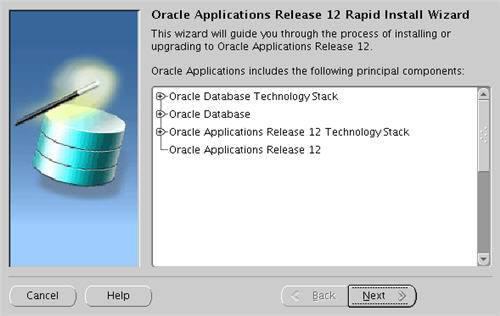
2. Accept the default "Install Oracle Applications Release 12" option by clicking the "Next" button.


Post Installation
Adjust the following paths and commands by replacing "play" and "PLAY" with the database name you chose during the installation.
Add the following into the "/home/oracle/.bash_profile" file.
DB_HOME=/u01/oracle/PLAY/db/tech_st/10.2.0; export DB_HOME
APPL_TOP=/u01/oracle/PLAY/apps/apps_st/appl; export APPL_TOP
COMMON_TOP=/u01/oracle/PLAY/inst/apps/PLAY_testapps01; export COMMON_TOP
To switch environments, move to the appropriate home directory and run the environment script, like.
cd $DB_HOME
. ./PLAY_testapps01.env
Shutdown/Startup
Adjust the following paths and commands by replacing "play" and "PLAY" with the database name you chose during the installation.
To shutdown the system issue the following commands.
cd $COMMON_TOP/admin/scripts/
./adstpall.sh apps/apps
cd $DB_HOME
. ./PLAY_testapps01.env
cd $ORACLE_HOME/appsutil/scripts/PLAY_testapps01
./addlnctl.sh stop PLAY
./addbctl.sh stop immediate
To start the system issue the following commands.
cd $DB_HOME
. ./PLAY_testapps01.env
cd $ORACLE_HOME/appsutil/scripts/PLAY_testapps01
./addlnctl.sh start PLAY
./addbctl.sh start
cd $COMMON_TOP/admin/scripts/
./adstrtal.sh apps/apps
./adcmctl.sh start apps/apps
Rapid Installation Wizard Portal
Once the installation is complete, the Rapid Installation Portal can be accessed using the following information.
* URL: http://machine-name:8000/OA_HTML/AppsLogin
* Username: SYSADMIN
* Password: SYSADMIN
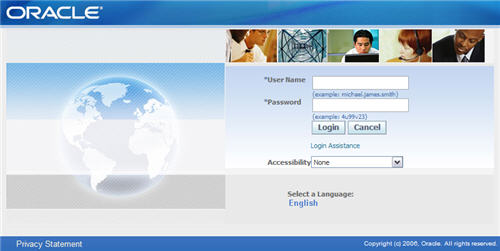
To change the SYSADMIN passowrd do the following.
* Log in to the eBusiness Suite homepage as SYSADMIN
* Click on the "preferences" link (top-right).
* Enter the old and new passwords.
* 90 GB for a fresh install with a production database:
Application tier file system - 35 GB
Database tier file system - 55 GB
* 243 GB for a fresh install with a Vision Demo database.
Application tier file system - 35 GB
Oracle Applications (12.1) Installation on Enterprise Linux 4
Unpack Files
Create a staging area for the Oracle Applications software.
mkdir /StageR12
cd /StageR12
# Start Here
mkdir startCD
# APPL_TOP
mkdir oraApps
# RDBMS
mkdir oraDB
# Tools
mkdir oraiAS
# Databases
mkdir oraAppDB
Hosts File
The "/etc/hosts" file must contain a fully qualified name for the server.
<IP-address> <fully-qualified-machine-name> <machine-name>
Set Kernel Parameters
Add the following lines to the "/etc/sysctl.conf" file.
kernel.shmall = 2097152
kernel.shmmax = 2147483648
kernel.shmmni = 4096
kernel.msgmni = 2878
kernel.msgmax = 8192
kernel.msgmnb = 65535
# semaphores: semmsl, semmns, semopm, semmni
kernel.sem = 250 32000 100 142
fs.file-max = 131072
net.ipv4.ip_local_port_range = 1024 65000
net.core.rmem_default=262144
net.core.rmem_max=262144
net.core.wmem_default=262144
net.core.wmem_max=262144
Run the following command to change the current kernel parameters:
/sbin/sysctl -p
Add the following lines to the "/etc/security/limits.conf" file.
* soft nofile 65536
* hard nofile 65536
* soft nproc 16384
* hard nproc 16384
Add the following line to the "/etc/pam.d/login" file, if it does not already exist.
session required /lib/security/pam_limits.so
Setup
The following additional packages are required. Depending on the update/respin version of Enterprise Linux, the exact package versions and locations may vary.
rpm -Uvh binutils-2*
rpm -Uvh compat-db-*
rpm -Uvh compat-gcc-32-3*
rpm -Uvh compat-gcc-32-c++-3*
rpm -Uvh compat-libstdc++-296-2*
rpm -Uvh compat-libstdc++-33-3*
rpm -Uvh control-center-2*
rpm -Uvh gcc-3*
rpm -Uvh gcc-c++-3*
rpm -Uvh glibc-2*
rpm -Uvh glibc-common-2*
rpm -Uvh gnome-libs-1*
rpm -Uvh libaio-0*
rpm -Uvh libstdc++-3*
rpm -Uvh libstdc++-devel-3*
rpm -Uvh make-3*
rpm -Uvh openmotif21*
rpm -Uvh setarch-1*
rpm -Uvh sysstat-5*
rpm -Uvh xscreensaver-4.*
Due to all the package inter-dependencies, it probably makes sense to copy all these packages from the CDs to a single directory, then install then using the following command. For convenience, I wrapped all the necessary packages for an OEL 4.5 installation into a single tar file (12-rh4-rpms.tar), making subsequent installations much simpler.
rpm -Uvh *.rpm
Create the new groups and users.
groupadd oinstall
groupadd dba
groupadd oper
groupadd apache
useradd -g oinstall -G dba oracle
passwd oracle
useradd -g oinstall -G apache apache
passwd apache
Create the directories in which the Oracle software will be installed.
mkdir -p /u01
chown -R oracle:oinstall /u01
Login as the oracle user and add the following line at the end of the ".bash_profile" file.
# Oracle 10g
if [ $USER = "oracle" ]; then
if [ $SHELL = "/bin/ksh" ]; then
ulimit -p 16384
ulimit -n 65536
else
ulimit -u 16384 -n 65536
fi
fi
Installation
Log into the oracle user. If you are using X emulation then set the DISPLAY environmental variable.
DISPLAY=<machine-name>:0.0; export DISPLAY
Start the Rapid Install Wizard by issuing the following commands.
cd /Stage11i/startCD/Disk1/rapidwiz/
chmod u+x rapidwiz
./rapidwiz
Follow any instructions and rerun as requested. The Rapid Installation Wizard installation is shown below.
1. Click the "Next" button on the welcome screen.

2. Accept the default "Install Oracle Applications Release 12" option by clicking the "Next" button.

3. Select the "Decline Oracle Connection Tools Agreement" option, then click the "Next" button.

4. Select the "Create a new configuration" option, then click the "Next" button.

5. Accept the default port pool by clicking the "Next" button.

6. Select the "fresh database" database type, enter a database name, in this case I used "PLAY", then click the "Next" button.

7. Select the "Suite Licensing" option, then click the "Next" button.

8. Accept the default products by clicking the "Next" button.

9. Select the appropriate country functionality, then click the "Next" button.

10. Select the appropriate territory and characterset information, then click the "Next" button.

11. Check the node configuration settings, then click the "Next" button.

12. Accept the node information by clicking the "Next" button.

13. Wait for the system check status to complete.

14. Assuming all the system checks were completed successfully, click the "Next" button.

15. Click the "Next" button on the installation review screen.

16. Click the "Yes" button to start the installation.

17. Wait while the installation takes place.
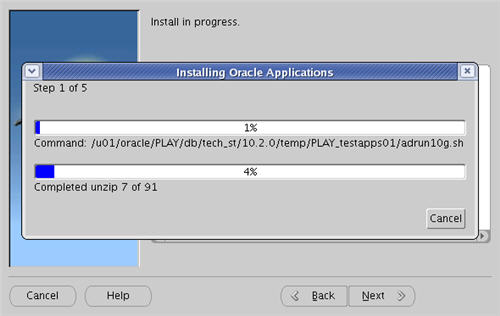
18. Assuming all the post-install checks are successful, click the "Next" button.

19. Click the "Finish button to exit the Rapid Install Wizard.

Adjust the following paths and commands by replacing "play" and "PLAY" with the database name you chose during the installation.
Add the following into the "/home/oracle/.bash_profile" file.
DB_HOME=/u01/oracle/PLAY/db/tech_st/10.2.0; export DB_HOME
APPL_TOP=/u01/oracle/PLAY/apps/apps_st/appl; export APPL_TOP
COMMON_TOP=/u01/oracle/PLAY/inst/apps/PLAY_testapps01; export COMMON_TOP
To switch environments, move to the appropriate home directory and run the environment script, like.
cd $DB_HOME
. ./PLAY_testapps01.env
Shutdown/Startup
Adjust the following paths and commands by replacing "play" and "PLAY" with the database name you chose during the installation.
To shutdown the system issue the following commands.
cd $COMMON_TOP/admin/scripts/
./adstpall.sh apps/apps
cd $DB_HOME
. ./PLAY_testapps01.env
cd $ORACLE_HOME/appsutil/scripts/PLAY_testapps01
./addlnctl.sh stop PLAY
./addbctl.sh stop immediate
To start the system issue the following commands.
cd $DB_HOME
. ./PLAY_testapps01.env
cd $ORACLE_HOME/appsutil/scripts/PLAY_testapps01
./addlnctl.sh start PLAY
./addbctl.sh start
cd $COMMON_TOP/admin/scripts/
./adstrtal.sh apps/apps
./adcmctl.sh start apps/apps
Rapid Installation Wizard Portal
Once the installation is complete, the Rapid Installation Portal can be accessed using the following information.
* URL: http://machine-name:8000/OA_HTML/AppsLogin
* Username: SYSADMIN
* Password: SYSADMIN

To change the SYSADMIN passowrd do the following.
* Log in to the eBusiness Suite homepage as SYSADMIN
* Click on the "preferences" link (top-right).
* Enter the old and new passwords.
Monday, November 24, 2014
Loading XML Documents Into an Oracle Database with External Tables
External tables allow Oracle to query data that is stored outside the database in flat files. The ORACLE_LOADER driver can be used to access any data stored in any format that can be loaded by SQL*Loader. No DML can be performed on external tables but they can be used for query, join and sort operations. Views and synonyms can be created against external tables. They are useful in the ETL process of data warehouses since the data doesn't need to be staged and can be queried in parallel. They should not be used for frequently queried tables.
Step1: Create XXAA_XML directory in bin location and change permissions
$ mkdir XXAA_XML
$ chmod 777 XXAA_XML
$ cd XXAA_XML
Step2 : Upload the xml file to XXAA_XML directory
$ ls –lrt
12939_04112014_045006.xml
12939_05112014_081219.xml
12939_05112014_081216.xml
12939_05112014_081221.xml
Step3 : Run the below command to create XXAA_XML_XT_DATA.dat file in bin folder
This SQLLoader file must be created that contains the paths to the XML documents to be able to load the needed XML files. This can be achieved via the following statement (while your command prompt is in the XXAA_XML directory that contains the XML documents):
$ ls -l *.xml | awk '{print "\/XXAA_XML\/"$9}' > /u01/apps88/apps/apps_st/appl/CUSTOM/12.0.0/bin/XXAA_XML_XT_DATA.dat
$ cat XXAA_XML_XT_DATA.dat
/XXAA_XML/12939_04112014_045006.xml
/XXAA_XML/12939_05112014_081216.xml
/XXAA_XML/12939_05112014_081219.xml
/XXAA_XML/12939_05112014_081221.xml
As you can see, the XXAA_XML_XT_DATA.dat file lists all XML files starting with “/XXAA_XML/…”. This will be our fixed starting point for our Oracle Directory alias we will create later on so the “XXAA_XML_XT_DATA.dat” file can be used in our external table.
Change the permissions for XXAA_XML_XT_DATA.dat file
$ chmod 777 XXAA_XML_XT_DATA.dat
Step4 : Create a directory for bin folder
CREATE OR REPLACE DIRECTORY XXAA_XT_DIR AS '/u01/apps88/apps/apps_st/appl/CUSTOM/12.0.0/bin';
select * from all_directories
where 1=1
and directory_name = 'XXAA_XT_DIR'
Step5 : Create External table with above directory 'XXAA_XT_DIR' and SQL Loader file ‘XXAA_XML_XT_DATA.dat’
CREATE TABLE XXAA_XML_XT_DOCUMENTS
(
FILENAME VARCHAR2(100), -->XML Filename
DOCUMENT CLOB -->XML File Data
)
ORGANIZATION EXTERNAL
(
TYPE ORACLE_LOADER
DEFAULT DIRECTORY XXAA_XT_DIR --> Directory for '/u01/apps88/apps/apps_st/appl/CUSTOM/12.0.0/bin' location( Created the directory in Step4 )
ACCESS PARAMETERS (FIELDS (FILENAME CHAR(100)) COLUMN TRANSFORMS (DOCUMENT FROM lobfile (FILENAME)))
LOCATION ('XXAA_XML_XT_DATA.dat') -->Stores the list of xml file names (in step3 will create this file in bin folder)
)
Via the XXAA_XT_DIR directory alias the external table is able to find the XML documents specified in the contents of “XXAA_XML_XT_DATA.dat”.
SELECT * FROM XXAA_XML_XT_DOCUMENTS

Step6: Create a staging table based on the XML file
<?xml version="1.0" encoding="utf-8"?>
<RPS>
<Header>Oracle apps88</Header>
<Search>
<User>Oracle apps88</User>
<DateSearched>Tuesday, September 30, 2014</DateSearched>
<TimeSearched>10:00:02 PM</TimeSearched>
<AlertType>YELLOW FLAG</AlertType>
<SearchType>Exact</SearchType>
<Name>N/A</Name>
<Company>Beltech</Company>
<Address>Tres Arroyos 1241 Captial Federal Buenos Aires</Address>
<Country>AR</Country>
<Comment>SUPPLIER_1892\REMIT TO_10487</Comment>
</Search>
</RPS>
CREATE TABLE XXAA_XML_XT_STG
(
FILE_TYPE VARCHAR2(40 BYTE), --> XML (Static)
FLAG VARCHAR2(40 BYTE), --> AlertType
UNIQUE_REFERENCE VARCHAR2(90 BYTE), --> Comment
CONTACT_NAME VARCHAR2(90 BYTE), --> Name
ORGANIZATION_NAME VARCHAR2(120 BYTE), --> Company
ADDRESS_INFO VARCHAR2(1000 BYTE), --> Company
COUNTRY VARCHAR2(60 BYTE), --> Country
CREATION_DATE TIMESTAMP(0) DEFAULT sysdate
);
SELECT * FROM XXAA_XML_XT_STG;
Step7 : Create select statement get the column values from the XML documents in the external table
SELECT
'XML',
XMLCAST(XMLQUERY('/RPS/Search/AlertType' passing DOCUMENT returning content) AS VARCHAR2(40)),
XMLCAST(XMLQUERY('/RPS/Search/Comment' passing DOCUMENT returning content) AS VARCHAR2(90)),
XMLCAST(XMLQUERY('/RPS/Search/Name' passing DOCUMENT returning content) AS VARCHAR2(90)),
XMLCAST(XMLQUERY('/RPS/Search/Company' passing DOCUMENT returning content) AS VARCHAR2(120)),
XMLCAST(XMLQUERY('/RPS/Search/Address' passing DOCUMENT returning content) AS VARCHAR2(1000)),
XMLCAST(XMLQUERY('/RPS/Search/Country' passing DOCUMENT returning content) AS VARCHAR2(60))
FROM (SELECT XMLTYPE(DOCUMENT) DOCUMENT FROM XXAA_XML_XT_DOCUMENTS)
The used “select XMLTYPE(DOCUMENT) DOCUMENT from XML_XT_DOCUMENTS” in the from clause will get the XML documents from the external table and feed it via the DOCUMENT column alias into the XMLQUERY bit of the statement via the PASSING clause.
The XPATH expression ‘/RPS/Search/AlertType’ now gets the needed ‘AlertType’ element values of the XML document input and is transformed via the XMLCAST operator into a VARCHAR2(100) datatype.
Step8: Create a view for above query
CREATE OR REPLACE VIEW XXAA_XML_XT_DOCUMENTS_V(FILE_TYPE,FLAG,UNIQUE_REFERENCE,CONTACT_NAME,ORGANIZATION_NAME,ADDRESS_INFO,COUNTRY)
AS
SELECT
'XML',
XMLCAST(XMLQUERY('/RPS/Search/AlertType' passing DOCUMENT returning content) AS VARCHAR2(40)),
XMLCAST(XMLQUERY('/RPS/Search/Comment' passing DOCUMENT returning content) AS VARCHAR2(90)),
XMLCAST(XMLQUERY('/RPS/Search/Name' passing DOCUMENT returning content) AS VARCHAR2(90)),
XMLCAST(XMLQUERY('/RPS/Search/Company' passing DOCUMENT returning content) AS VARCHAR2(120)),
XMLCAST(XMLQUERY('/RPS/Search/Address' passing DOCUMENT returning content) AS VARCHAR2(1000)),
XMLCAST(XMLQUERY('/RPS/Search/Country' passing DOCUMENT returning content) AS VARCHAR2(60))
FROM (SELECT XMLTYPE(DOCUMENT) DOCUMENT FROM XXAA_XML_XT_DOCUMENTS)
;
Step9 : Insert the data into above created staging table
INSERT INTO XXAA_XML_XT_STG(FILE_TYPE,FLAG,UNIQUE_REFERENCE,CONTACT_NAME,ORGANIZATION_NAME,ADDRESS_INFO,COUNTRY)
SELECT * FROM XXAA_XML_XT_DOCUMENTS_V;
COMMIT;
SELECT * FROM XXAA_XML_XT_STG;

Saturday, December 22, 2012
Unix Commands
1) Editing the FILE:-
--------------------------
*) To come to end of file:- G
*) To delete the single word(can be free space):- dw
*) to delete the current single char:- (Esc and x)
*) To delete the complete line:- dd
*) To right over in the file:- cw
*) To remove the case sensitive:- :set ic
*) To Enable the case sensitive:- :set noic
*) Copy the complete line:- yy
*) Paste what ever copied:- p
2) GUN ZIP the file:-
-----------------------------
gzip file_name
Note:- While trying to download gunzip file from server to local machine it should be done in binary mode. Then it can exact using the wipzip software in WINDOWS Operating System.
After gzip, if we want to unzip the file then use the following.
gunzip file_name
2.1) To unzip or gunzip the file :-
---------------------------------------------
gunzip file_name
Example:-
gunzip XYZ_1.0_5.tar.gz
2.2) To untar the file:-
------------------------------
tar -xvf file_name
Example:-
tar -xvf XYZ_1.0_5.tar
3) To run the strings for the spawand program:-
-------------------------------------------------------------
strings -a (shell_script_file_name) > (logfile.log)
Example:-
strings -a GLPURGE > /home/partners-home/hex/preddy/phani1.log
3.1) Basic grep command:-
-----------------------------------
Example:-
grep 'DROP index' adwork001.log > /home/partners-home/xyz/preddy/dropindex.txt
Note:- grep command is just like the search for some specfic word in your windows file.
In Windows Operating System, we use the (CTRL+F) and then we give the word we want to search. Similarly, grep is used for UNIX or LINUX Operating system. In the above Example, I am searching for the 'DROP index' Word in adwork001.log file. And I want all the finding of this search stored in some file. So, I have given the path and file name where it should save.
4) Specfic to some project:-
-------------------------------------
To check the number lst files:-
-----------------------------------------
Example:-
ls -altr *.lst | wc -l
Note:- If some folder have some specfic extension files, then we can count the number of that specfic extension files then we can use the above command. In the above example, I am searching for the 'lst' extension files count.
To check the number of sql files with hit files :-
------------------------------------------------------------
grep '\.sql' *.lst | wc -l
Note:- Say, we have some .sql files names in all the lst files in some folder. Then we can use the grep command to count the sql file names.
To check the number of files with hits in the lst file:-
------------------------------------------------------------------
grep 'Number of files with hits : [1-9]' *.lst
Note:- You can also give the count of the files with the range. In the above example, I have givne the range from 1 to 9. If it find any number from this range then, it will get in the count.
To create the file of the complete module :-
--------------------------------------------------------
grep '\.sql' *.lst > lst_sql_'module_name'.txt
Example:-
grep '\.sql' *.lst > lst_sql_gl.txt
Note:- The above example to do the search and to the search results in some given file name.
5) To find the file in the current folder and subfolder:-
---------------------------------------------------------------------
find . -name ‘file_name*.sql’ -print
Example:-
find -i . -name 'poXWFUNT*.sql' -print
Note:- POXWFUNT.sql is the file name which I want to search. 'i' in the above command indicates that, search should not be based on case sensitive.
6) To grep the file for a specific word:-
-------------------------------------------------
grep -i 'WORD' FILE_NAME > log_file_name
Example:-
grep -i 'ALTER table' adwork001.log > altertable.txt
7) To Know the PORT number of Env file:-
-----------------------------------------------------
setenv | grep PORT
Note:- Run the above command after login to Instance. And you have would have the read privileges for the file. This is mostly useful for people, who are working in the Oracle Application.
7.1) For specfic session we can change the variable value:-
-------------------------------------------------------------------------
setenv variable_name variable_value
Example :- The following was the current value.
INSTANCE_ENVID=XYZ12
(Used the following command to check the value (setenv | grep OBT)).
setenv OBTADMIN_ENVID OBT_12
The above command has changed the value of the variable.
---------------------------------------------------------------------
OBTADMIN_ENVID=OBT_12
Note:- If you exit from the session and then variable value will be revert back.
8) To know the path of the log and out files of the application:-
------------------------------------------------------------------------------
>>cd $APPLCSF
There you will have the log and out folders.
You can also try the following command to know the value of the APPLCSF variable.
env | grep log
9) Turn-on the application server:-
----------------------------------------------
./oraWebAndForms.sh start Instance name
Example:-
./oraWebAndForms.sh start XYZ12
Note:-
------
1) XYZ12 is the Instane name.
2) After turnning the Database and concurrent manager up. still the application front end will not open. The you need to run the above script from the applmgr user
To login to different user:-
------------------------------
sudo su - applmgr
Note:- applmgr is the superuser name. This username can depends on the DBA, what they have given at your Instance.
9.1) If you are getting 500 Internal error message after bounce back then try this:-
-----------------------------------------------------------------------------------------------------
Try to restart your application and restart your manage and see if it resolve the issue.
For the 12 Release, the above solution may not work. After you cleared _pages in R12, you'll need to recompile because the default mode is 'justrun' instead of 'recompile' as was in 11i.
I did the following while applmgr in my Instance XYZ12 env and the login now works:
1. cd $FND_TOP/patch/115/bin
2. ./ojspCompile.pl --compile --flush -p 2
(You can check if you are able to open the application or not). If you are still facing the issue then try rebounce the application and see if it resolve the issue).
3. /home/applmgr/oraWebAndForms.sh bounce xyz12
(./oraWebAndForms.sh bounce zyx12)
Note:- You need to run the above script in the applmgr user
sudo su - applmgr
10) To start or stop the Internal concurrent manager:-
---------------------------------------------------------------------
cd $ADMIN_SCRIPTS_HOME/
./adcmctl.sh start apps/apps
./adcmctl.sh stop apps/apps
Note:- This need to be run from applmgr user
-----
sudo su - applmgr
11) To stop the database or start the database:-
------------------------------------------------------------
cd $ORACLE_HOME/appsutil/scripts/xyz12_server/
Note:- The above path is specfic to my server Instance.
To stop the database:- adstopdb.sql*
To start the database:- adstrtdb.sql*
Note:- This need to be run from Oracle user.
------
sudo su - oracle
12) Converting all the tabs to space in the file:-
-----------------------------------------------------------
By setting the following options in your ~/.vimrc file,
when you use tabs, spaces are actually entered into the file,
although it "feels" like there are tabs because backspaces work as they would with tabs.
You'll never have to worry about differing tabstop standards again.
Try it out, I promise you’ll be completely sold!
set softtabstop=4
set expandtab
set shiftwidth=4
Note also that if you want to convert a file with tabs to all spaces, set the above options and then use:
:retab!
13) To know the Operating system on server (unix):- >uname
Example:-
-----------
2007.08.06-3:18:03 preddy@oscar[6]/home/partners-home/xyz/phani/xyz_23Jul/abc/la/utils > uname
HP-UX
14) To know the Operating system on server from database:-
---------------------------------------------------------------------------
begin
dbms_output.put_line('Port String: '||dbms_utility.port_string);
end;
15) Admin utility to compile all the invalid objects:-
-----------------------------------------------------------------
i) This utility is avilable for the applmgr user. Use the following command to login with applmgr user.
>>sudo su - applmgr
ii) Choose the Intance and then use the following command to run the adadmin utility.
>>adadmin
{ Note:- It will ask for the $APPL_TOP path. If the default path is not the correct one then provide the correct path.
It will ask for the Log file name. (Default name willl be (adadmin.log)).
It will ask if you can be notified by email if a failure occurs. (Default will be set for NO).
It will ask for the Batchsize (Default is 1000).
It will ask for the correct database name.
It will ask to enter the password for your 'SYSTEM' ORACLE schema.("manager" will be the password).
(manager password will be only one you enter manually. Rest of things you take the default values.)
It will ask to enter the ORACLE password of Application Object Library (default will be [APPS]).
}
iii) To will give the menu with different options.
-----------------------------------------------------
We will choose the "Compile/Reload Applications Database Entities menu" option. It will be 3 option normally.
iv) To will again give the other set of menu optins.
----------------------------------------------
We will choose "Compile APPS schema" option to compile all the Invalid objects in APPS schema.
(Note:- You can also use $ORACLE_HOME/rdbms/admin/utlrp.sql (which will compile all invalid objects thru SVRMGRL.)).
17) To know apps password:-
--------------------------------------
cd $ORACLE_HOME/reports60/server
more CGIcmd.dat
You will find userid=APPS/apps_pass@Instance_name
Note:- If you have the FTP access for server files. Then we can know the Apps password.
18) QUOTA:-
---------------------Say employees are allocated a certain amount of disk space on the file system for their personal files, say 1000Mb. If you go over your quota, you are given some 'n' days to remove excess files.
--------------------------
*) To come to end of file:- G
*) To delete the single word(can be free space):- dw
*) to delete the current single char:- (Esc and x)
*) To delete the complete line:- dd
*) To right over in the file:- cw
*) To remove the case sensitive:- :set ic
*) To Enable the case sensitive:- :set noic
*) Copy the complete line:- yy
*) Paste what ever copied:- p
2) GUN ZIP the file:-
-----------------------------
gzip file_name
Note:- While trying to download gunzip file from server to local machine it should be done in binary mode. Then it can exact using the wipzip software in WINDOWS Operating System.
After gzip, if we want to unzip the file then use the following.
gunzip file_name
2.1) To unzip or gunzip the file :-
---------------------------------------------
gunzip file_name
Example:-
gunzip XYZ_1.0_5.tar.gz
2.2) To untar the file:-
------------------------------
tar -xvf file_name
Example:-
tar -xvf XYZ_1.0_5.tar
3) To run the strings for the spawand program:-
-------------------------------------------------------------
strings -a (shell_script_file_name) > (logfile.log)
Example:-
strings -a GLPURGE > /home/partners-home/hex/preddy/phani1.log
3.1) Basic grep command:-
-----------------------------------
Example:-
grep 'DROP index' adwork001.log > /home/partners-home/xyz/preddy/dropindex.txt
Note:- grep command is just like the search for some specfic word in your windows file.
In Windows Operating System, we use the (CTRL+F) and then we give the word we want to search. Similarly, grep is used for UNIX or LINUX Operating system. In the above Example, I am searching for the 'DROP index' Word in adwork001.log file. And I want all the finding of this search stored in some file. So, I have given the path and file name where it should save.
4) Specfic to some project:-
-------------------------------------
To check the number lst files:-
-----------------------------------------
Example:-
ls -altr *.lst | wc -l
Note:- If some folder have some specfic extension files, then we can count the number of that specfic extension files then we can use the above command. In the above example, I am searching for the 'lst' extension files count.
To check the number of sql files with hit files :-
------------------------------------------------------------
grep '\.sql' *.lst | wc -l
Note:- Say, we have some .sql files names in all the lst files in some folder. Then we can use the grep command to count the sql file names.
To check the number of files with hits in the lst file:-
------------------------------------------------------------------
grep 'Number of files with hits : [1-9]' *.lst
Note:- You can also give the count of the files with the range. In the above example, I have givne the range from 1 to 9. If it find any number from this range then, it will get in the count.
To create the file of the complete module :-
--------------------------------------------------------
grep '\.sql' *.lst > lst_sql_'module_name'.txt
Example:-
grep '\.sql' *.lst > lst_sql_gl.txt
Note:- The above example to do the search and to the search results in some given file name.
5) To find the file in the current folder and subfolder:-
---------------------------------------------------------------------
find . -name ‘file_name*.sql’ -print
Example:-
find -i . -name 'poXWFUNT*.sql' -print
Note:- POXWFUNT.sql is the file name which I want to search. 'i' in the above command indicates that, search should not be based on case sensitive.
6) To grep the file for a specific word:-
-------------------------------------------------
grep -i 'WORD' FILE_NAME > log_file_name
Example:-
grep -i 'ALTER table' adwork001.log > altertable.txt
7) To Know the PORT number of Env file:-
-----------------------------------------------------
setenv | grep PORT
Note:- Run the above command after login to Instance. And you have would have the read privileges for the file. This is mostly useful for people, who are working in the Oracle Application.
7.1) For specfic session we can change the variable value:-
-------------------------------------------------------------------------
setenv variable_name variable_value
Example :- The following was the current value.
INSTANCE_ENVID=XYZ12
(Used the following command to check the value (setenv | grep OBT)).
setenv OBTADMIN_ENVID OBT_12
The above command has changed the value of the variable.
---------------------------------------------------------------------
OBTADMIN_ENVID=OBT_12
Note:- If you exit from the session and then variable value will be revert back.
8) To know the path of the log and out files of the application:-
------------------------------------------------------------------------------
>>cd $APPLCSF
There you will have the log and out folders.
You can also try the following command to know the value of the APPLCSF variable.
env | grep log
9) Turn-on the application server:-
----------------------------------------------
./oraWebAndForms.sh start Instance name
Example:-
./oraWebAndForms.sh start XYZ12
Note:-
------
1) XYZ12 is the Instane name.
2) After turnning the Database and concurrent manager up. still the application front end will not open. The you need to run the above script from the applmgr user
To login to different user:-
------------------------------
sudo su - applmgr
Note:- applmgr is the superuser name. This username can depends on the DBA, what they have given at your Instance.
9.1) If you are getting 500 Internal error message after bounce back then try this:-
-----------------------------------------------------------------------------------------------------
Try to restart your application and restart your manage and see if it resolve the issue.
For the 12 Release, the above solution may not work. After you cleared _pages in R12, you'll need to recompile because the default mode is 'justrun' instead of 'recompile' as was in 11i.
I did the following while applmgr in my Instance XYZ12 env and the login now works:
1. cd $FND_TOP/patch/115/bin
2. ./ojspCompile.pl --compile --flush -p 2
(You can check if you are able to open the application or not). If you are still facing the issue then try rebounce the application and see if it resolve the issue).
3. /home/applmgr/oraWebAndForms.sh bounce xyz12
(./oraWebAndForms.sh bounce zyx12)
Note:- You need to run the above script in the applmgr user
sudo su - applmgr
10) To start or stop the Internal concurrent manager:-
---------------------------------------------------------------------
cd $ADMIN_SCRIPTS_HOME/
./adcmctl.sh start apps/apps
./adcmctl.sh stop apps/apps
Note:- This need to be run from applmgr user
-----
sudo su - applmgr
11) To stop the database or start the database:-
------------------------------------------------------------
cd $ORACLE_HOME/appsutil/scripts/xyz12_server/
Note:- The above path is specfic to my server Instance.
To stop the database:- adstopdb.sql*
To start the database:- adstrtdb.sql*
Note:- This need to be run from Oracle user.
------
sudo su - oracle
12) Converting all the tabs to space in the file:-
-----------------------------------------------------------
By setting the following options in your ~/.vimrc file,
when you use tabs, spaces are actually entered into the file,
although it "feels" like there are tabs because backspaces work as they would with tabs.
You'll never have to worry about differing tabstop standards again.
Try it out, I promise you’ll be completely sold!
set softtabstop=4
set expandtab
set shiftwidth=4
Note also that if you want to convert a file with tabs to all spaces, set the above options and then use:
:retab!
13) To know the Operating system on server (unix):- >uname
Example:-
-----------
2007.08.06-3:18:03 preddy@oscar[6]/home/partners-home/xyz/phani/xyz_23Jul/abc/la/utils > uname
HP-UX
14) To know the Operating system on server from database:-
---------------------------------------------------------------------------
begin
dbms_output.put_line('Port String: '||dbms_utility.port_string);
end;
15) Admin utility to compile all the invalid objects:-
-----------------------------------------------------------------
i) This utility is avilable for the applmgr user. Use the following command to login with applmgr user.
>>sudo su - applmgr
ii) Choose the Intance and then use the following command to run the adadmin utility.
>>adadmin
{ Note:- It will ask for the $APPL_TOP path. If the default path is not the correct one then provide the correct path.
It will ask for the Log file name. (Default name willl be (adadmin.log)).
It will ask if you can be notified by email if a failure occurs. (Default will be set for NO).
It will ask for the Batchsize (Default is 1000).
It will ask for the correct database name.
It will ask to enter the password for your 'SYSTEM' ORACLE schema.("manager" will be the password).
(manager password will be only one you enter manually. Rest of things you take the default values.)
It will ask to enter the ORACLE password of Application Object Library (default will be [APPS]).
}
iii) To will give the menu with different options.
-----------------------------------------------------
We will choose the "Compile/Reload Applications Database Entities menu" option. It will be 3 option normally.
iv) To will again give the other set of menu optins.
----------------------------------------------
We will choose "Compile APPS schema" option to compile all the Invalid objects in APPS schema.
(Note:- You can also use $ORACLE_HOME/rdbms/admin/utlrp.sql (which will compile all invalid objects thru SVRMGRL.)).
17) To know apps password:-
--------------------------------------
cd $ORACLE_HOME/reports60/server
more CGIcmd.dat
You will find userid=APPS/apps_pass@Instance_name
Note:- If you have the FTP access for server files. Then we can know the Apps password.
18) QUOTA:-
---------------------Say employees are allocated a certain amount of disk space on the file system for their personal files, say 1000Mb. If you go over your quota, you are given some 'n' days to remove excess files.
To check your current quota and how much of it you have used.
For that you can use the following command.
> quota -v
19) DF:- To find out how
much space is left on the fileserver, use the following command. > df .
20) DU:-The du command
outputs the number of kilobyes used by each subdirectory. Useful if you have
gone over quota and you want to find out which directory has the most files.
From your home-directory, use the following command.
> du -s *
The -s flag will display only a summary (total
size) and the * means all files and directories.
21) GZIP:-
---------------
---------------
This reduces the size of a file, thus freeing valuable disk
space. This is compress the file. Is it similar to the Winzip in the Windows
Operating system.
Example:-
> ls -l phani.txt
note the size of the file using ls -l , then to
compress phani.txt, use the following command.
> gzip phani.txt
This will compress the file and place it in a file called phani.txt.gz
To see the change in size, use ls -l again.
To expand the file, use the gunzip command.
> gunzip phani.txt.gz
This is similar to the Unzip the file in your Windows Operating
system.
22) ZCAT:-
----------------
22) ZCAT:-
----------------
zcat will read gzipped files without needing to uncompress
them first.
> zcat phani.txt.gz
If the text scrolls too fast for you, pipe the output
though less .
> zcat phani.txt.gz | less
23) FILE:-
File classifies the named files according to the type of
data they contain, for example ascii (text), pictures, compressed data, etc..
To report on all files in your home directory, use the following command.
> file *
24) DIFF:-
----------------
----------------
This command compares the contents of two files and displays the
differences. Say you have a file called file1 and you edit
some part of it and save it as file2. To see the differences use
the following command.
> diff file1 file2
25) ECHO:-
------------------
echo $variable_value
The value of the environment variable can get from the echo command.
Example:-
echo $APPL_TOP
In the above command we get the APPL_TOP variable value set in the environment file. APPL_TOP is the environment variable in the environment file.
26) General Commands:-
------------------------------
------------------
echo $variable_value
The value of the environment variable can get from the echo command.
Example:-
echo $APPL_TOP
In the above command we get the APPL_TOP variable value set in the environment file. APPL_TOP is the environment variable in the environment file.
26) General Commands:-
------------------------------
|
Command
|
Meaning
|
|
ls
|
list
files and directories
|
|
ls -a
|
list
all files and directories
|
|
mkdir
|
make a
directory
|
|
cd directory
|
change
to named directory
|
|
cd
|
change
to home-directory
|
|
cd ~
|
change
to home-directory
|
|
cd ..
|
change
to parent directory
|
|
pwd
|
display
the path of the current directory
|
|
cp file1 file2
|
copy
file1 and call it file2
|
|
mv file1 file2
|
move or
rename file1 to file2
|
|
rm file
|
remove
a file
|
|
rmdir directory
|
remove
a directory
|
|
cat file
|
display
a file
|
|
less file
|
display
a file a page at a time
|
|
head file
|
display
the first few lines of a file
|
|
tail file
|
display
the last few lines of a file
|
|
grep 'keyword' file
|
search
a file for keywords
|
|
wc file
|
count
number of lines/words/characters in file
|
|
command > file
|
redirect
standard output to a file
|
|
command >> file
|
append
standard output to a file
|
|
command < file
|
redirect
standard input from a file
|
|
command1 |command2
|
pipe
the output of command1 to the input of command2
|
|
cat file1 file2 > file0
|
concatenate
file1 and file2 to file0
|
|
sort
|
sort
data
|
|
who
|
list
users currently logged in
|
|
*
|
match
any number of characters
|
|
?
|
match
one character
|
|
man command
|
read
the online manual page for a command
|
|
whatis command
|
brief
description of a command
|
|
apropos keyword
|
match
commands with keyword in their man pages
|
|
ls -lag
|
list
access rights for all files
|
|
chmod [options] file
|
change
access rights for named file
|
|
command &
|
run
command in background
|
|
^C
|
kill
the job running in the foreground
|
|
^Z
|
suspend
the job running in the foreground
|
|
bg
|
background
the suspended job
|
|
jobs
|
list
current jobs
|
|
fg %1
|
foreground
job number 1
|
|
kill %1
|
kill
job number 1
|
|
ps
|
list
current processes
|
|
kill 26152
|
kill
process number 26152
|
Subscribe to:
Posts (Atom)
