🔹 Join the OracleApps88 Telegram Group - Stay up to date with the latest on Oracle EBS R12 and Oracle Cloud/Fusion Applications. 📌 Telegram Group : https://t.me/OracleApps88

💡 Facing issues copying code/scripts or viewing posts? We're here to help!
📬 Contact on Telegram : https://t.me/apps88
📱 Telegram/WhatsApp: +91 905 957 4321
📧 Email Support: OracleApp88@Yahoo.com
Showing posts with label CASH. Show all posts

Saturday, November 22, 2025

CASH - Oracle Cash Management

 1. Which of the following banking activities will not cause you to reverse transactions?

a) NSFs, Rejected Receipts

b) Stopped payments

c) Bank charges

d) NSF and Rejected Receipts


2. What is the correct order of month-end closing in Oracle Cash Management?

a) GL Reconciliation report

b) Post transactions from Oracle Payables and Oracle Receivables

c) Reconcile bank statements

d) Journal Import

a) C B D A

b) C D B A

c) C A D B

d) D A B C

e) A B C D


3. What do you need to do with bank statement lines that are marked as External?

a) Reverse receipts

b) Stop payments

c) Create miscellaneous transactions

d) Mark them as Internal afterwards


4. What do you need to do with bank statement lines that are marked as Error?

a) Reverse receipts

b) Stop payments

c) Create miscellaneous transactions

d) Nothing

e) Mark them as Internal afterwards


5. Which of the following statements is true?

a) You cannot purge without archiving

b) You can archive without purging

c) Oracle Cash Management purges “Forecasting Open Interface” automatically

d) Oracle Cash Management purges Bank Statements in the open interface automatically

e) Bank statements from production tables can be deleted


6. What is the begin date used for in the system parameters in Oracle Cash Management?

a) Identify the start date of an open period

b) Identify the oldest date possible on your bank statement

c) Identify the oldest date of your transactions

d) Identify the first time you generate cash forecast

e) Identify oldest date for bank account


7. What must be entered if the transaction type is Miscellaneous Receipt or Miscellaneous Payment?

a) Correction method

b) Description

c) Effective date

d) Float days

e) None of the above


8. Which Oracle Applications module is considered to be part of cash outflow?

a) Payroll

b) Order Entry

c) General Ledger

d) Receivables

e) Assets


9. Which is NOT part of a forecast template?

a) Rows

b) Columns

c) Amounts

d) All of the above

e) None of the above


10. How can your forecast template include a forecast from the Forecasting open interface?

a) Have a row with a source type of AP Payments

b) Have a row with a source type of Open Interface Inflow

c) Have a row with a source type of Sales Orders

d) Check Use Open Interface in the system parameters

e) None of the above


11. How Oracle Cash Management is linked to third-party systems transactions?

a) Using a view

b) Using an open interface table

c) Not Possible


12. Which accounts are not used in Oracle Cash Management?

a) Bank charges account

b) Bank error account

c) Gains/losses

d) Suspense account

e) None of the above


13. What is the sequence of forms from finding a bank statement to reconciling manually?

a) Find bank statement ® bank statement ® reconcile bank statements ® bank statement lines ® find transactions ® available transactions

b) Find bank statement ® reconcile bank statements ®bank statement ® bank statement lines ® find transactions ® available transactions

c) Find bank statement ® bank statement ® bank statement lines ® reconcile bank statements ® find transactions ® available transactions

d) Find bank statement ® find transactions ® available transactions ® reconcile bank statements ®bank statement ® bank statement lines

e) None of the above


14. User-Defined Inflow and User-Defined Outflow source types are used for what purpose?

a) To include open interface forecasts

b) To allow users to add rows

c) To allow users to add columns

d) To link with third-party system transactions

e) B and C


15. Subsequent to importing a bank statement into Oracle Cash Management, which concurrent program do you need to run?

a) Auto Reconciliation

b) Bank Import program

c) Bank Import program and Auto Reconciliation

d) Copy transactions from Oracle sub ledgers such as Oracle Receivables and Oracle Payables

e) Payables Transfer To General Ledger


16. Which system parameter does not apply to the open interface?

a) Purge

b) Use Open Interface

c) Receivables Activity

d) Lines per Commit

e) None of the above


17. Which one is an international scenario in Oracle Cash Management?

a) Transaction using functional currency, bank account using functional currency

b) Transaction using foreign currency, bank account using functional currency

c) Transaction using foreign currency, bank account using same foreign currency

d) Transaction using foreign currency, bank account using different foreign currency

e) None of the above


18. In forecast generation, what is the purpose of the amount threshold?

a) To set the maximum value to be included in the forecast

b) To set the minimum value to be included in the forecast

c) To add to the amounts in the forecast

d) To subtract from the amounts in the forecast

e) To set the AVERAGE value to be included in the forecast


19. What is a tolerance limit?

a) The tolerance amount

b) The tolerance percent amount

c) The smaller of the tolerance amount and tolerance percent amount

d) The greater of the tolerance amount and tolerance percent amount

e) The average of the tolerance limit and percent


20. What is the first step in Auto reconciliation?

a) Mark transactions as clear

b) Matching

c) Generate accounting entries

d) Select transactions

e) Create payments


21. What is correct order of month-end closing in Cash Mgt?

A) GL reconciliation report

B) Post transactions for payables and receivables

C) Reconcile bank statements

D) Journal import

a) cbda b) cbad c) abcd d) dabc e) Not applicable


22. During Bank Reconciliation, you noticed one check, which was Void Payment in Payables. Which Transaction Type best fits this case?

a) Rejected

b) Stopped

c) NSF

d) Miscellaneous Payment

e) Payment


23. Cash Management supports Document Sequence Feature. Identify from the following where we can use Sequential Document Numbers?

a) Bank Accounts

b) Bank Statements

c) Cash Forecasts

d) Cash Positioning

e) Bank Interface Lines


24. What is the purpose of Forecasting Open Interface?

a) To collect General Ledger Journal Entries and include them in Cash Forecast

b) To collect Cash Receipts generated in Receivables and include them in Cash Forecast

c) To collect Cash Outflow generated from Disbursements in Payables and include them in Cash Forecast

d) To collect externally generated cash flow amounts and include them in cash forecast


25. How can we reconcile receipts and payments that originate from applications other than Receivables, payables and GL?

a) Using Bank Statement Open Interface

b) Using GL_INTERFACE

c) Using Forecasting Open Interface

d) Using Reconciliation Open Interface


26. Configuring bank transaction codes will help identify different bank transaction types in each bank statement. At what level do we need to configure transaction codes?

a) For each bank

b) For each bank branch

c) For each bank account

d) For each bank statement

e) For each accounting period in GL

Friday, September 9, 2016

Cash Management Period Closing Procedures

Introduction
      Oracle Cash Management is an enterprise wide solution for managing liquidity and controlling cash.
      Cash Management gives you direct access to expected cash flows from your operational systems.
      You can quickly analyze enterprise wide cash management cash requirements and currency exposures, ensuring liquidity and optimal use of cash resources.

Benefits of Cash Management
      Forecast cash flows in any currency and in multiple time periods
      Streamline the reconciliation process
      Monitor for exceptions and fraud
      Forecast based on historical or future transactions
      Manage the cash cycle efficiently and with control

Cash Management Integration
      Cash Management is integrated with Payables, Receivables and General Ledger.
      Payables: Payments information automatically transfers to CM without any process.
      Receivables: to transfer Receipts information to CM remittance process is required.
      From AR only remitted eligibility transactions will transfer to CM.
      GL: If we have entered any journal in GL with cash account, that data will flow to CM.

      Cash Management is used mainly for 2 purposes
          1. Reconciliation
          2. Forecasting

      Forecasting is used to identify the future cash inflows and outflows of an Organization.

Reconciliation:
·         Normally at the end of every period, the entries in the cash book are compared with entries in the pass book.
·         The exact causes of differences are scrutinized and then bank reconciliation statement is prepared.
·         Necessary suitable entries will passed in the cash book.
 
Reconciliation process is 3 types:
  1. Manual Clearing Process
  2. Manual Reconciliation
  3. Automatic Reconciliation

Manual Clearing Process:
In this process we will manually clear the transactions without entering the bank statement into Oracle.

Manual Reconciliation:
In this process we will manually enter the bank statement into Oracle. We will take the transactions one by one and search for the bank transactions manually and mark the transactions as reconciled.

Automatic Reconciliation Process
Automatic Reconciliation process can be done in 2 ways:
ü  We will enter bank statement into Oracle and run a program, so that system will search the transactions and will reconcile automatically.
ü  In another way, in the case where bank statement transactions are more and not possible to enter manually into oracle, in that case, we will upload the bank statement into Oracle through specific formats:
          BAI 2 & SWIFT 940
ü  These formats are used to upload bank statements into Oracle.
ü  Once we received bank statements in the above formats from the bank, we will place these files in a directory where cash management application is stored.
ü  We have to run “Bank statement load” program.
ü  We have to define Bank codes for transaction identification purpose.

Cash Management Period Closing Procedures 
Ensure the following before closing the Payables & Receivables.
       Any reconciliation transactions created by Cash Management are properly entered.
       Account balances are updated.
       Reports include accurate information.
 
Specifically the following steps are recommended.  
1.    Reconcile all your bank statements.
2.    Transfer all transactions from Payables to your General Ledger interface tables.
3.    Run Journal Import in General Ledger.
4.    Post journals in General Ledger.
5.    Run the GL Reconciliation Report from Cash Management for each bank account. This report compares the statement balance you specify to the General Ledger ending balances.
6.    Review the report for errors.

7.    If there are errors in the report, correct them in Cash Management, as needed. Repeat the above steps until there are no more errors.

Tuesday, May 17, 2016

Oracle R12 Bank, Branch, Bank Account and Payment Document Creation

Bank Creation
1. Navigate to Payables Manager àSetup àPayment àBanks and Bank Branches. Click on Banks tab and then click on Create button.
(Can also use Cash Management Responsibility àSetup àBanks àBanks navigation)

2. Select the country, enter Bank name & number and other Bank details. Then click on “Save and Next” button.

3. Click on “Create” button under  Address tab and add the address details.

Enter the address details and click on apply button

Then click on “Save and Next” button.

4. Click on “Create Contact” button.

Enter the details and click on “Apply” button.

5. Click on “Finish” button and the Bank is created.

Bank Branch Creation
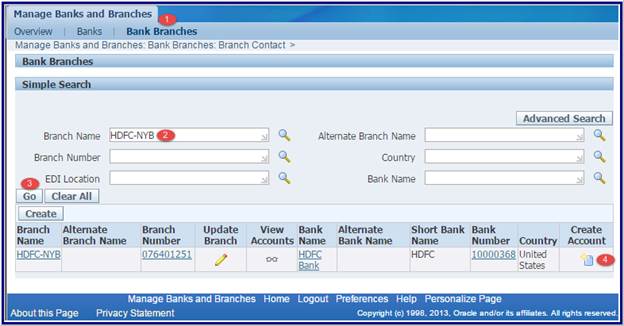
1. Search the newly created bank from Payables Manager àSetup àPayment àBanks and Bank Branches and then click “Create Branch”.

2. Click on continue button and enter the Branch name,Branch number and select Branch type.Then click on “Save and Next” button.

Branch Types are:
·                     ABA: American Bankers Association
·                     CHIPS: Clearing House Interbank Payment System
·                     SWIFT: Society for Worldwide Interbank Financial Telecommunication
·                     OTHERS

1. Please note: The Bank Branch Number is called the Routing Transit Number for US Banks. This number has to conform to a "check digit validation" as required for US Banks as part of Federal Financial Requirement #PMC-18. The branch using ABA will have to have Routing Transit Number.

2. Entered "Routing Transit Number" (Branch Number) did not conform to the check digit algorithm. Hence Errors as:
The Check Digit Validation for Routing Transit Number has failed. Please enter as correct value for the Routing Transit Number.

(2). Details of the algorithm are given in the Cash Management User Guide, Appendix F - Country Specific Bank Account Validations: United States

Validation Rules:
The fields are checked for validity by adopting the following rules:

Routing number here is our bank branch number. The following validations are performed for all US bank branches. The first 8 digits of the bank branch number must not be 0 -- so the valid range is 00000001 to 99999999. Valid Check digit, which is the 9th digit of the bank branch number, should be 0-9. The bank branch number field is optional.

Validation
A new validation is required for the Bank Branch Number for US Banks as part of federal financial requirement # PMC-18. The field is a nine-digit numeric-only field. The validation requires prohibiting fewer or more than nine characters, allow for only numeric characters, and prohibit the entry of all zeroes in this field. The purpose of the edit is to ensure the validity of the routing transit number (RTN) and prevent erroneous returns or payments. The ninth digit of the Number field will be used to represent the Check Digit. The authenticity of the Check Digit will be validated as well. The Check Digit is computed using
Modulus 10 as follows:

1. Multiply each digit in the Routing Number by a weighting factor. The weighting factors for each digit are:
Position 1 2 3 4 5 6 7 8
Weights 3 7 1 3 7 1 3 7
2. Add the results of the eight multiplications.
3. Subtract the sum from the next highest multiple of 10. The result is the 
Check Digit.
Example:
Routing No.: 0 7 6 4 0 1 2 5
Multiply by: 3 7 1 3 7 1 3 7
Sum: 0 49 6 12 0 1 6 35 = 109
Check Digit = 1 (110 minus 109)

In this example, the routing transit number and check digit 076401251 will pass validation if this is the value entered into the Bank Branch Number field. If the Bank Branch Number passes validation, then the record is saved, otherwise an error message is returned.

3. Click on “Create” button under  Address tab and add branch address details.


Then click on “Save and Next” button.

4. Click on “Create Contact” button. Enter the details and click on “Apply” button.


5. Click on “Finish” button and the Branch is created.

Bank Account
1. Search the newly created Branch under Bank Branches tab and then click on “Create Account”.

2. Click on continue button and enter the Bank Account Owner.Also select the “Account Use” . Then click on Next button.


3. Enter the account Name and other account information’s. Then click on “Save and Next” button.

4. Enter the Account Control informations and click on “Save and Next” button.
·         Multiple Currency Payments: Enable this option if you want to use this bank account to pay invoices entered in multiple currencies. You can select this option only if the Use Multiple Currencies Payables option is enabled and of the bank account is in your functional currency.
·         Allow Zero Payments: Enable this option to allow zero-amount payments from this bank account.
·         Pooled Account: Enable this option if you use Automatic Offsets and you want to associate multiple companies with this bank account. Oracle Payables creates one corresponding cash accounting entry for each liability distribution. Oracle Payables builds the cash account based on the cash account defined for the bank account, and on the account segments of the liability lines.
·         Maximum Outlay: Enter the largest currency outlay that you allow for a payment batch for this bank account. The system displays a warning if the payment batch exceeds this amount. However, you can continue to process the payment batch. You can override this default amount when initiating a payment batch.
·         Minimum Payment: Enter the lowest payment amount that you allow in a payment batch. You can override this default amount when initiating a payment batch. Maximum Payment. Enter the largest payment amount that you allow in a payment batch. You can override this default amount when initiating a payment batch.


5. Click on “Add Organization Access button” and enter the Organization and select Account Use options.Then click on Continue button.


5. Enter the Payables and GL options and click on “Save and Next” button.


6. Click on “Create Contact” button if you want to create contact.

Then click on Finish button and the Bank account will be created.

Payment Document
1. Select the Account and click on “Manage Payment Documents” button.

2. Click on Create button and enter the Document Name.Then select the Paper Stock Type and Payment Format.Alsoenter First and Last(Last not mandatory) Document number.
Select Paper Stock Type as Blank Stock for Electronic Payment format and Prenumbered Stock for Paper payment format. 


3. Then click apply and the Payment Document will be created.


The Check Digit Validation For Routing Transit Number

Please use and follow the validation rule for the branch number, account number for the country United stated, this validation is mentioned in oracle Cash management, 

Validation rule to consider while setting the above (bank account, branch number) for country United States are as below:

The fields are checked for validity by adopting the following rules:

Field Rules:
Bank Number • No validation.

Branch Number • This field is labelled as 'Routing Transit Number'.
  • Length should be a maximum of 9 numeric characters.
  • If the length is less than 9, then it is converted to a 9 digit number by prefixing it with as many leading zeroes as is necessary.
  Note that on padding the number to 9 digits, the first 8 digits cannot be all zeroes.

For example, 001 and 000007 are invalid Routing Transit
Numbers because on padding to 9 digits, they become -
000000001, 000000007, and thus having 8 leading zeroes.

• A check algorithm is applied on the Routing Transit Number.

Account Number • No validation.
Check Digit • No validation.

Check Algorithm for Routing Transit Number
1. The ninth digit of the Number field is used to represent the Check Digit.
2. A calculated Check Digit is computed from the remaining 8 digits using Modulus10 algorithm.
3. Multiply each digit in the Routing Transit Number by a weighting factor. The
weighting factors for each digit areas given in the following table:

Digit Factor
1st 3
2nd 7
3rd 1
4th 3
5th 7
6th 1
7th 3
8th 7

4. The digits of the Routing Transit Number are multiplied by the associated factor.
The computed sum is then calculated by summing the totals.
5. Subtract the sum from the next highest multiple of 10. The result is the calculated
Check Digit. This should be the same as the 9th digit of the Branch Number or
Routing Transit Number, else the Branch Number or Routing Transit Number is
invalid.

For Example:
Digit Value Factor Result
1st 0 3 0
2nd 7 7 49
3rd 6 1 6
4th 4 3 12
5th 0 7 0
6th 1 1 1
7th 2 3 6
8th 5 7 35

So the Check Digit = 1 (110 minus 109)
In this example, the Routing Transit Number '076401251' will pass validation.

Wednesday, September 9, 2015

Oracle Cash Management Standard Features Differences between 11i and R12

Sl
Business Process - Standard Features
11i
R12
1
Banks
These are tables which hold the bank details irrespective of supplier or internal banks.
• ap_bank_branches
• ap_bank_accounts_all
These changes make easier and more reliable by
• Single access point
• Single Legal Entity ownership
• Usage rights granted to one or more Organizations
o Reconciliation option defined at Bank Account level
o  More flexibility and control
2
Comparing the 11i Vs R12
We can notice the bank was utilized into three different places , finance ,payroll and treasury, which requires altogether a different setup.
 It was one of the big issues with integration aspect, as significant problem was recognized once the Expense management and payroll uses same bank for the respective person.
These issues has been resolved in R12 release.
3
International Bank Account Number (IBAN)
Does not exist in 11i.
International Bank Account Number (IBAN) is an international standard for identifying bank accounts across national borders in a way that would minimize the risk of propagating transaction errors. Cash Management now validates IBAN at the time of recording bank account details.
4
Bank Identifier Code (BIC)
Does not exist in 11i.
Bank Identifier Code (BIC) is a unique identification for bank branches. This code can be 8 or 11 characters in length. Cash Management now validates the length of BIC when recording bank branch details.
5
Payment Group based Bank Statement Reconciliation
Does not exist in 11i.
Oracle Cash Management now utilizes the new Payment Group Number attribute as an optional matching criterion for manual and automated reconciliation of bank statements.
6
Option to Override Country-Specific Validation for Bank Accounts
Does not exist in 11i.
Sometimes legacy bank account numbers do not conform to modern country-specific validation rules. Users can now disable the default country-specific bank validations to migrate legacy bank account information.
7
EDIFACT Bank Statement Format Update
Does not exist in 11i.
The bank statement loader program supports EDIFACT statements. With this release, the following additional data processing features are addressed:
• Support for non-numeric characters in bank balances. The opening and closing balance amounts sent in the EDIFACT statements contain non-numeric characters. The bank statement loader and import program is enhanced to convert the non-numeric characters into numeric values.
• Support loading and importing the Record 05. The current seeded loader is enhanced to handle the record type 05. This additional record is defined as part of the EDIFACT standard and contains the contextual information of Record 04.
8
Copy Bank Transaction Codes
Does not exist in 11i.
Bank transaction codes are used by banks to identify the types of transactions on bank statements. The codes are set up for each bank account for reconciliation purposes. For organizations having several bank accounts, it can be a cumbersome process to manually setup these transaction codes since most bank accounts for a specific bank use the same transaction codes.
A new concurrent program has been provided to copy the bank transaction codes from one bank account to another bank account(s).
9
Load Bank Statements for the Current Day
Does not exist in 11i.
In previous releases, users could only import bank statements and perform bank balance maintenance for past dates. Users can now enter or import bank statements and perform bank balance maintenance for the current date.
10
Manual Entry in Cash Position
Does not exist in 11i.
The cash position functionality has been enhanced to allow cash managers the ability to manually enter cash flows into their cash positions allowing for greater flexibility in their decision making process.


If you are facing any issues while copying the Code/Script or any issues with Posts, Please send a mail to OracleApp88@Yahoo.com or message me at @apps88 or +91 905 957 4321 in telegram.
Best Blogger TipsGet Flower Effect